Platform Administration
Updated 9 September 2026
Support Workflow Release · 9 September 2026: Tenant-wide AI and simplified Inbox menus are deployed. This update supersedes ticket-level AI decisions and support-case allowlists. Screenshots use fictional local data.
Administration owns policy, usage limits, staff access, capture exclusions, retention and service records. Studio owns discovery, knowledge, process maps, agent publication and improvement review. Support Settings adds routing, signatures, canned replies, directory entries, channel policy and held-message review.
Find Your Workspace
Use the left navigation to move between Workspaces, Support Settings and AI Studio. Studio's tools appear underneath AI Studio. On a narrow screen, select Toggle Navigation to open the menu.
The Appearance button at the top right offers Use Teams or System, Light, Dark and High Contrast. The saved choice applies across Administration, Studio and the support Inbox in the same browser. It changes display only.
Current Build Status
The current /admin/ console and Support Settings have live single-user sign-in evidence. Routing, optional signatures, categories and canned replies were configured through that console. Other control paths have local regression and fictional-browser evidence; these checks do not establish live directory synchronization or multi-user acceptance. Each runtime manages one workspace. Registered future deployments do not create shared tenant access automatically.
Control Ownership
99 Venture operates platform administration. A customer support supervisor does not receive this role automatically. Tenants receive the Teams support flow; 99 Venture retains policy, knowledge publication, agent personality and model configuration. Studio administrators can inspect source evidence and existing support knowledge, so this access must remain explicitly restricted.
Microsoft tenant settings remain limited to identity and application integration. Platform policy is stored by OCDIT, with versioned changes and required reasons.
Configure Sign-In
- The deployment engineer sets
ADMIN_ORIGINto the owned HTTPS origin andPLATFORM_ADMINSto explicitly authorized Entra object IDs. - The app administrator opens the isolated OCDIT app registration's
Authentication settings. Add a Web redirect URI:
<ADMIN_ORIGIN>/admin/auth/callback. - Use the isolated pilot application credentials, or supply the dedicated
ADMIN_TENANT_ID,ADMIN_CLIENT_IDandADMIN_CLIENT_SECRETsettings. - Open
/admin/, choose Sign In with Microsoft, and complete sign-in. - Verify that an authorized administrator succeeds and an ordinary support user is denied. Do not change tenant-wide permissions to make this test pass.
The live console is disabled when PLATFORM_ADMINS is empty. Sign-in uses
authorization code with PKCE and a server session; provider tokens are not stored
in browser storage. Sessions expire within one hour and on service restart.
Writes require the session's CSRF token and the configured origin.
See Microsoft's Authorization Code Flow.
Change Policy and Limits
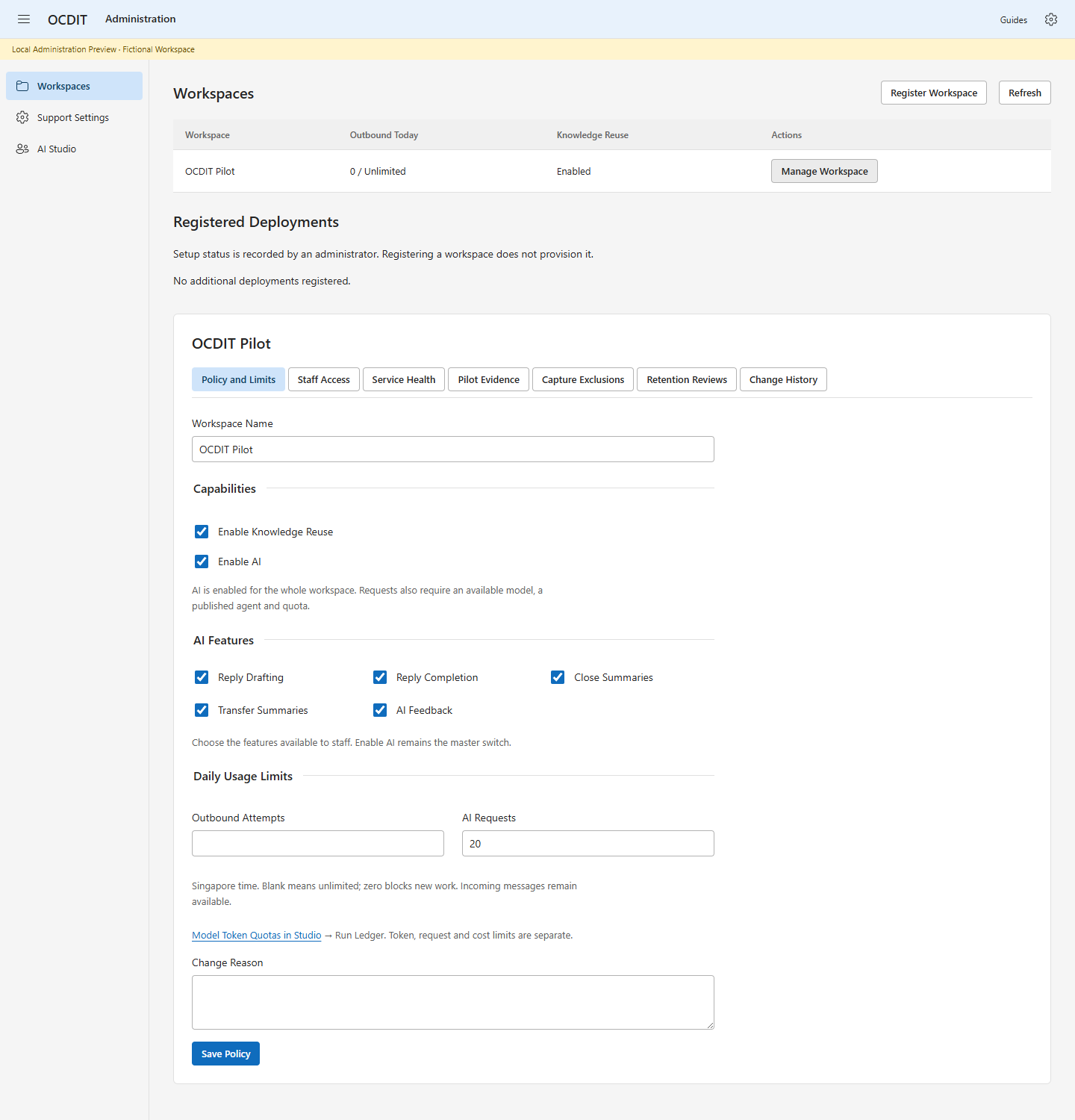
- Choose Manage Workspace → Policy and Limits.
- Set the workspace name, permitted capabilities and daily limits.
- Enter Change Reason and choose Save Policy.
- Review Change History. Use Check Last Action after an uncertain save.
Outbound limits count all locally queued attempts, including failed attempts, in the current Singapore calendar day. Retrying the same saved action does not count twice. A blank limit means unlimited; zero blocks new outbound work. Incoming messages continue to be captured. Reducing a limit does not recall already queued or sent messages. Channel-specific reply windows and restrictions still apply.
These daily support limits are separate from Studio’s demo model-request budget. The earlier summary/category provider remains disabled in live configuration. Studio has its own explicitly configured provider and records whether each run used a model or deterministic simulation.
AI Feature Controls (Local Build)
The support-evolution build adds these controls to Policy and Limits. They are local implementation work until the release is deployed and verified.
- Use Enable AI as the master switch.
- Choose Reply Drafting, Reply Completion, Close Summaries, Transfer Summaries and AI Feedback independently.
- Enter Change Reason, then choose Save Policy. Review Change History.
- For model-token limits, open Model Token Quotas in Studio → Run Ledger.
Existing policies default all five feature permissions to enabled; the master AI switch, ticket data permission, provider configuration and quotas still apply. Turning on a checkbox does not provision a model, publish an agent or enable a missing workflow. Reply drafting/completion and reviewed close/transfer summaries use their individual gates. AI Feedback creates central review work; it does not train a model immediately. Token, request and cost limits remain independent.
If another administrator changes the policy, your rejected save keeps the form entries. Record your intended changes, select Refresh, review the latest policy and re-enter them. Use Check Last Action when a response is missing rather than submitting a second change.
Configure Support Operations
Open Support Settings for the six central tabs: Routing, Reply Signatures, Categories and Canned Replies, Held Messages, Directory and Connectors. Follow the Support Settings Guide.
Staff availability expires after eight hours. Routing uses explicit account/topic rules and available group members; it is not a GAL or presence integration. Channel pause can cancel queued replies only with explicit confirmation, while captured inbound messages remain. Sending replies block a pause; uncertain outcomes are never retried automatically. Held-message review acknowledges archive placement without reopening a ticket or creating a reply window.
Directory stores configured roles and managers. It does not grant permissions or synchronize Microsoft directory data. Connectors shows application policy and queue counts, not a provider connectivity test. Capture controls remain separate.
99 Venture reviews staff AI Feedback and case-study nominations in Studio AI Feedback. Tenant supervisors do not gain improvement publication powers.
Manage Staff Access
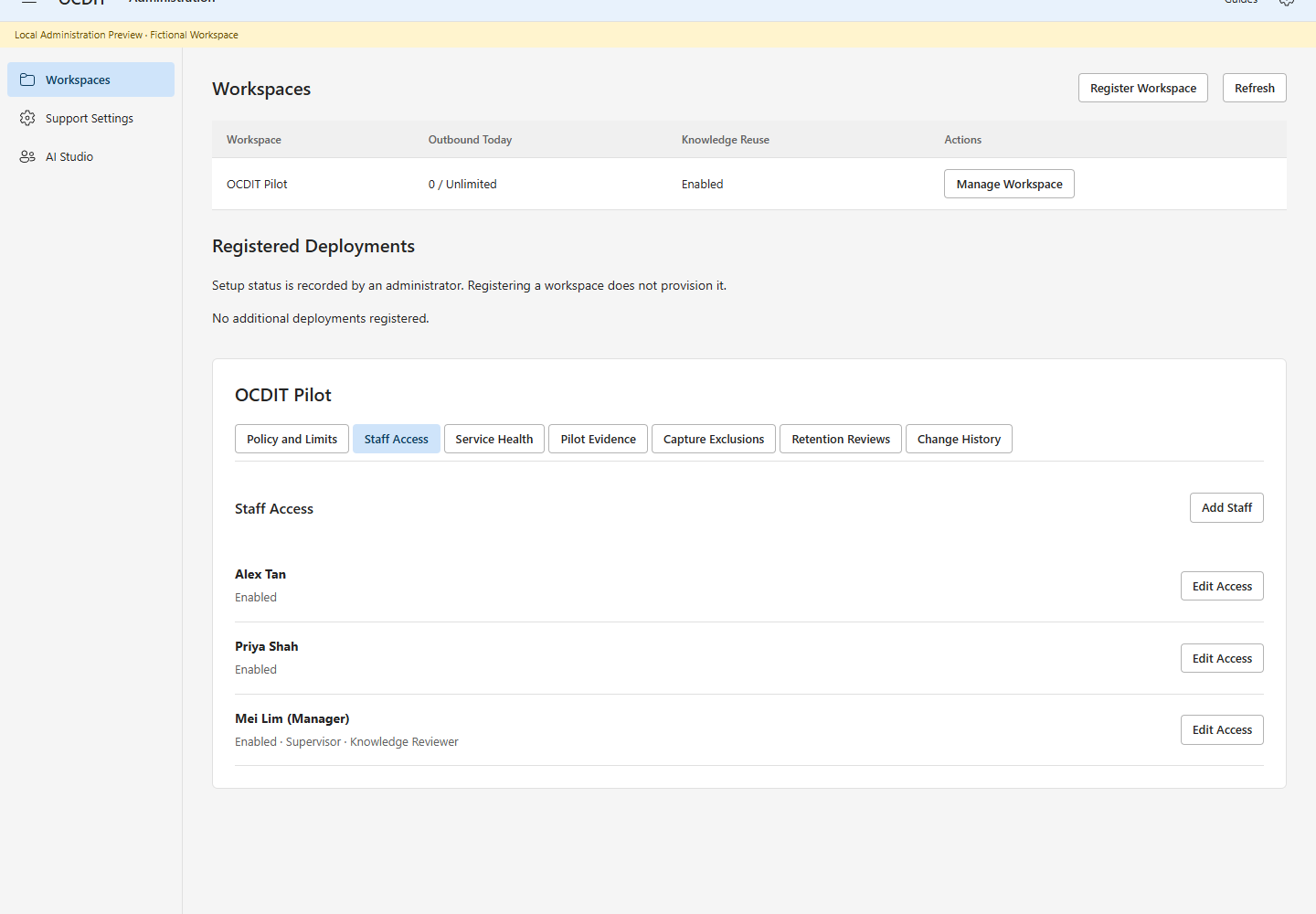
- Choose Staff Access, then Add Staff or Edit Access.
- Enter the employee's existing Entra object ID and name. Choose their roles.
- To disable access, clear Enabled and choose a replacement for assigned work.
- Enter Change Reason and choose Save Staff Access.
This changes OCDIT access only. It does not create a Microsoft account or license. Support and supervisor permissions are separate from platform administrator access. A support knowledge-review flag does not grant central knowledge-management access. Role changes take effect on the next authenticated action.
Offboarding preserves conversation history and records reassignment. Escalated work needs a supervisor replacement. Resolve queued or uncertain sends first; legacy sends without an actor ID also block offboarding. The last enabled support employee cannot be disabled until a replacement is enabled.
Local tests cover revocation, transfer, stale actions, safe retries and restart. The real pilot still uses one employee; no live account has been disabled.
Record Pilot Evidence
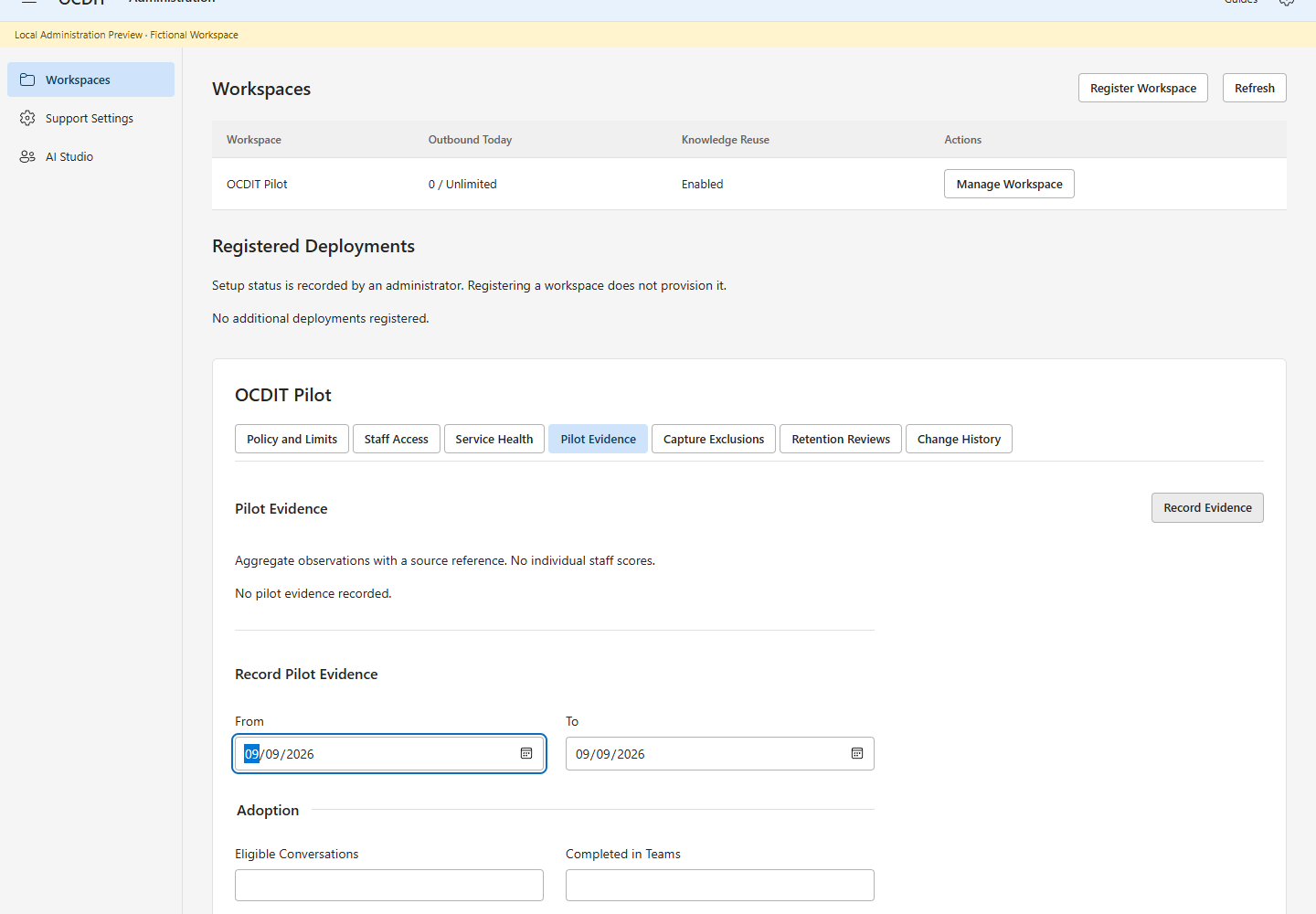
The form and calculations are locally tested. The hosted console was verified with the authorized pilot administrator; real operating evidence has not been entered.
- Choose Pilot Evidence, then Record Evidence.
- Set From and To in Singapore time.
- Enter each measured sample and result. Leave unmeasured pairs blank.
- Enter comparable baseline reply and unresolved-age medians in minutes, if measured. Record material audit or permission incidents; leave unknown values blank.
- Record the source, sample method and baseline dates in Evidence Reference.
- Choose Save Evidence. Open Evidence and Sample to inspect the counts.
Adoption is eligible conversations completed in Teams divided by all eligible conversations. Continuity is reviewed reassigned cases completed without the customer repeating core facts divided by reviewed reassigned cases. Preference is respondents preferring OCDIT divided by survey responses. These are recorded observations, not inferred employee activity or individual performance scores.
The reply comparison uses the selected period's captured first-contact cohort and its response sample at save time. Use the same definition and a comparable sample for the baseline. A missing sample or zero baseline produces Not Measured. Negative improvement means the measured response took longer. This comparison alone does not prove OCDIT caused a change.
Records are append-only. Correct an observation by recording a new one with the same dates and an explanation; earlier evidence remains available. Each record keeps its measured sample even when later messages arrive. The console shows the 20 most recent records. Historical records remain stored.
Administration Access Boundary
99 Venture controls policy, usage limits, deployment registration and staff grants. Only explicitly configured platform administrators can sign in to this portal. Tenant employees use Teams. Historical workspace-administrator flags do not grant portal access in this build; do not assign one as a way to admit a tenant employee.
A supervisor title or support knowledge-review flag does not grant administration access. Verify sign-in denial for ordinary support identities before adding real users. Each registered deployment authenticates its administrators independently.
Register an Isolated Workspace
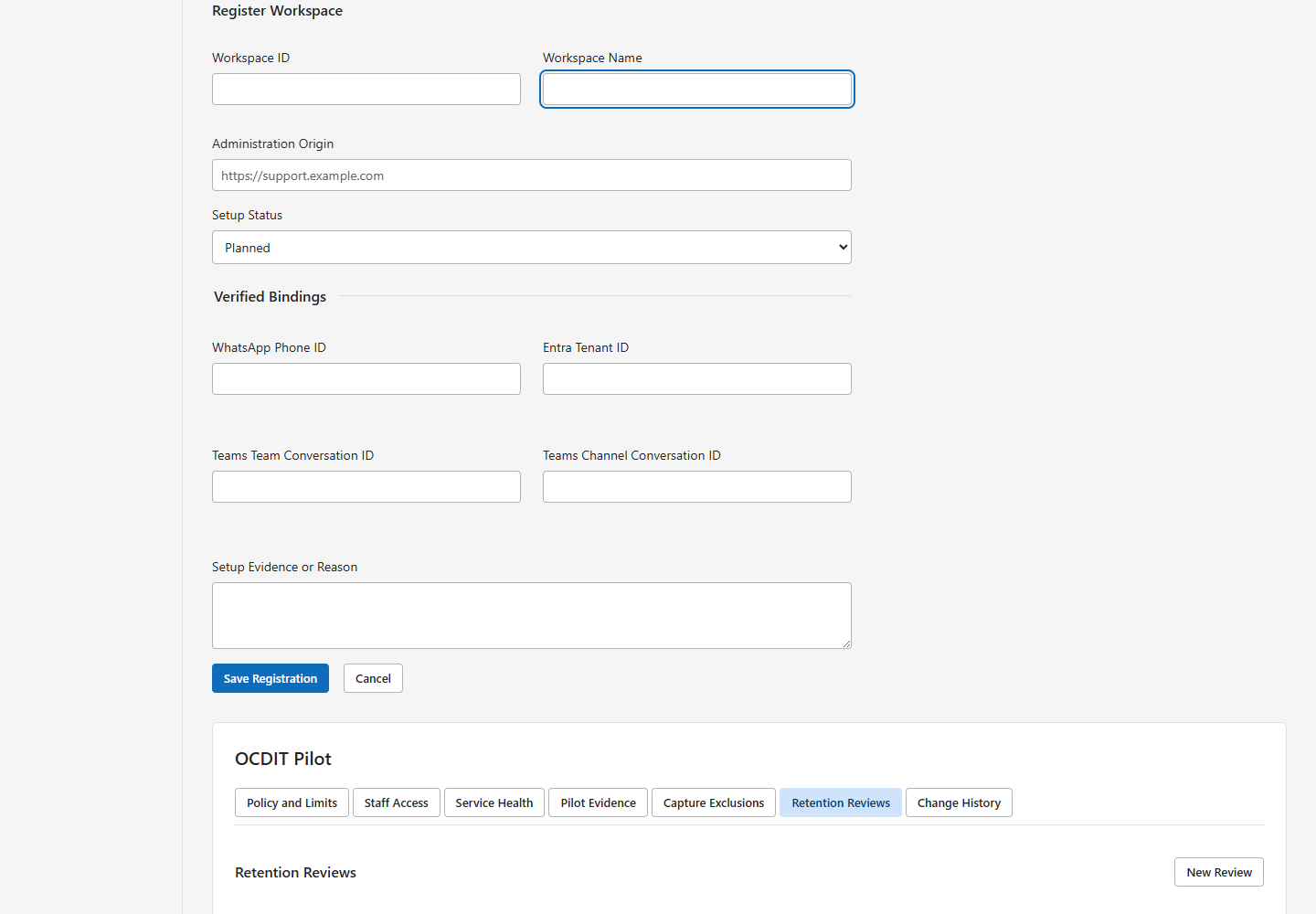
- Choose Register Workspace.
- Enter a stable Workspace ID, Workspace Name and HTTPS Administration Origin.
- Keep Setup Status at Planned while preparing the deployment.
- After verifying its deployment, record the WhatsApp phone ID, Entra tenant ID, Teams team and channel conversation IDs. Choose Verified by Administrator.
- Enter Setup Evidence or Reason, then Save Registration.
- Use Edit Registration for corrections or Open Administration for a verified deployment.
Registration does not provision resources, grant Microsoft permissions or combine transcripts. Verification is an administrator's recorded statement, not an automatic health check. Duplicate administration origins, verified WhatsApp identities and verified Teams support channels are rejected.
Each subsidiary needs its own runtime, database, credentials, Teams binding and
hostname. Before starting it, configure a unique WORKSPACE_ID, separate DB_PATH
and correct provider and Teams IDs. Never point it at another subsidiary's database.
Startup rejects existing conflicting bindings before recovery can alter delivery
state. Use separate OS service identities and file permissions so a compromised
runtime cannot read another workspace's credentials or database. Complete the
setup guide for each deployment, then verify real account isolation.
The directory is metadata only; each linked console authenticates independently.
Measurement Definitions
Ownership and unresolved age describe the current open queue when evidence is saved, not the selected period's historical queue. Age starts with the earliest customer message or reopening after the most recent resolution. Retagging and notes do not restart it. Compare only equivalent baseline snapshots.
Knowledge yield counts each item's first approval in the selected period per 100 cases resolved in that period. No resolved cases means no yield sample. Reuse counts provider-accepted linked replies in another case, using the outbound message's recorded time. Draft insertion, queued replies and reuse in the source case do not count. Workflow labels are frozen when the reply is queued; older replies without that evidence remain separately unclassified. Reapproval does not create a new knowledge item. These observations do not establish client acceptance.
Studio: Discovery, Visualization and Agents
Open /admin/studio/ with a 99 Venture platform-administrator account. Use
Discovery to import the fictional pack and review candidates, Process Map
to inspect and approve responsibility flows, and Agents to save and publish a
personality with approved knowledge and read-only tools.
Tenant staff do not manage the builder. With tenant AI enabled, assigned staff choose Draft with AI or Complete with AI beside the reply editor. They review and insert the result, then explicitly send it. Generation does not send or change assignment. There is no ticket-level AI grant or support-case allowlist.
99 Venture controls Enable AI for the tenant. Feature switches, capture/history access, provider configuration, publication, stop controls and quotas still apply. Knowledge Permissions governs learning/reuse separately; legacy case AI decisions no longer determine use. The demonstration uses high execution ceilings. Check Studio for current limits; provider credit remains separate.
Agents → Monitor → Pause All Agent Runs stops agent use. Knowledge → Source Permissions withdraws a source from future use; historical evidence is retained. Export Evidence downloads the source, decision, publication and run record as JSON. Treat it as controlled data, not a portable credential bundle or database backup.
The OCDIT Studio Guide contains the full walkthrough and six fictional screenshots. Demo Scenarios provides the portable source pack and eight deterministic rehearsal checks. Model calls, if enabled, have separate tracked usage; simulation does not call a model. Neither mode fine-tunes a model or imports SharePoint, OneDrive or Teams content through Graph.
Remaining Work
- Validate real-user and multi-workspace operating acceptance.
- Agree production source permissions, retention and provider configuration before importing company data.
- Provision and validate any future Graph connector separately; no tenant-wide permission is implied by this demo.