AI Feedback and Service Improvement
Updated 9 September 2026
Support Workflow Release · 9 September 2026: Simplified menus and tenant-wide AI are deployed. Screenshots use fictional local data.
Use AI Feedback to tell 99 Venture what an agent should learn so staff do not have to repeat the same guidance. Submission creates a review item; it does not train a model, publish knowledge or change an agent immediately.
Submit AI Feedback
- Open an active ticket with AI Feedback available.
- Open your name menu → AI Feedback → New Feedback.
- Choose Process, Knowledge, Product or Tooling.
- Enter a short Summary. In Suggestion, explain the correct response and when it applies.
- Select a supporting Source Message and review its preview. If the current AI draft is relevant, select Include Current AI Draft.
- Select Submit for Review.
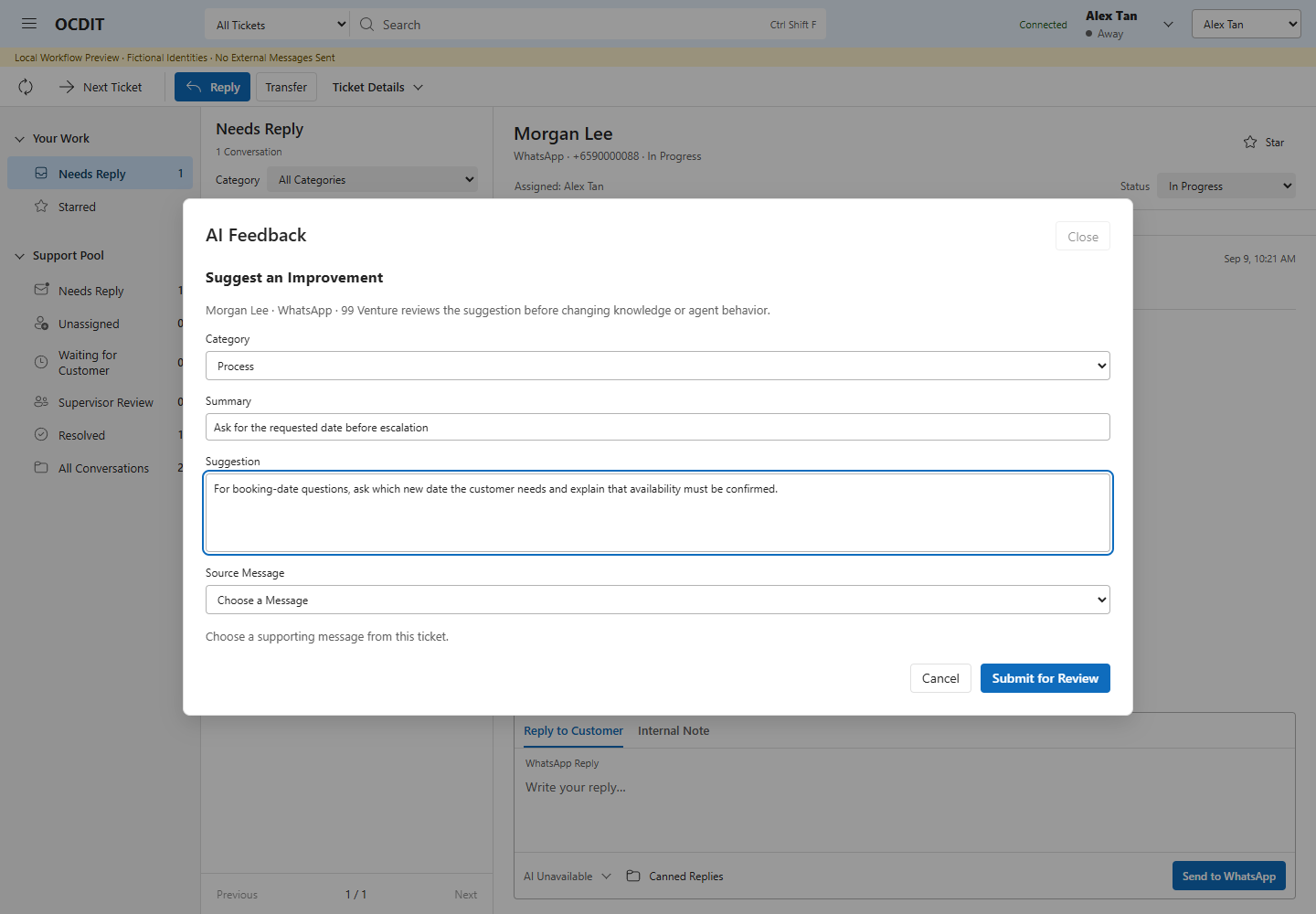
Load earlier messages before starting if the evidence is not currently visible. Source access still applies; previous-history permission is not bypassed. Feedback is internal and sends nothing to the customer. If AI Feedback is disabled centrally, its entry points are unavailable.
The original suggestion, author and source remain recorded. To correct the submission, create a new suggestion explaining the correction. After an unknown response, use Check Last Action rather than submitting another copy. Cancel discards the open form.
Follow the Review
Open your name menu → AI Feedback. Select a suggestion to read its source and Review History. Use the status filter, Current Case Only, Previous and Next to navigate accessible items.
Tenant staff, including supervisors, cannot record improvement decisions in Teams. 99 Venture owns review and implementation in Studio. Staff see the current recorded decision and review history where source access permits. A new central working revision awaits a new review; it does not inherit a previous implementation claim.
Review Centrally
- In 99 Venture Studio, open AI Feedback.
- Under Suggestions and Case Studies, choose a source. Use Previous Sources and Next Sources for additional pages.
- Select Import for Review, then Review Improvement.
- Record Planned or Declined with a reason, or make the required knowledge/agent changes first.
- To record Implemented, select a current published agent and completed evaluations run after import. Include applicable knowledge references and the decision reason.
Publication and evaluation checks are enforced separately. Marking feedback for review is not evidence that an improvement is effective.
When staff select Nominate for Case Study during resolution, the reviewed summary and notes appear as a central case-study source. It uses the same import/review workflow. Nomination alone performs no model call, sends no message and does not authorize training or publish the case.
Read the Service Report
Select Service Report, choose From and To, then Apply Dates. Dates include both selected days in Singapore time. The default is the last seven days including today; a range can cover up to 366 days.
Current Queue always describes the current open/unassigned/escalated backlog, knowledge nominations and outstanding delivery jobs. Changing the date range does not reconstruct an earlier backlog.
| Selected Period Metric | Definition |
|---|---|
| New Conversations | Tickets whose first captured incoming message is dated within the period. Profile links do not merge this count. |
| Incoming Messages | Captured incoming messages dated within the period; duplicate provider IDs are not counted twice. |
| Accepted Replies | Replies queued within the period that currently have an accepted, sent, delivered or read outcome. This is not proof of delivery. |
| Cases Marked Resolved | Distinct tickets with a recorded resolution action within the period. Closing a ticket does not delete that activity. |
| Handovers | Recorded handovers and ticket transfers within the period. Supervisor recovery is separate. |
| Median First Reply | Time from first captured incoming message to queuing the first reply that now has an accepted-or-better outcome. Only new conversations from the selected period with that reply queued before the period ended enter the sample. |
First Reply Sample shows the included count against all new conversations in the period. Unanswered cases do not enter the median. No Sample means there are no qualifying replies, not zero response time. Timestamps are captured message/queue timestamps, not delivery latency. Provider outcomes can arrive later, so rerunning a past period may change its reply counts and sample.
The report is a live operational view, not a frozen audit export, staff ranking, SLA result or causal measure of an improvement. Agree a business baseline before comparing performance. Message retention or data corrections may also affect later reports.
Administrator Notes
The tenant-wide AI switch and AI Feedback feature control govern the tenant entry point. There is no per-ticket AI permission. Central administration owns improvement review. Existing authentication, source-read restrictions and retention rules continue to apply; do not include confidential HR matters or unrelated customer history.
Feedback evidence and imported Studio improvement records are separate stored artifacts. Include both databases in backup and review their disposition before retention. Local regressions establish the tested authorization and UI behavior; they do not establish live multi-user or model-improvement outcomes.