Knowledge Permissions and Capture Controls
Updated 9 September 2026
Support Workflow Release · 9 September 2026: Simplified menus and tenant-wide AI are deployed. Screenshots use fictional local data.
Implementation Status
Knowledge reuse has a recorded decision for each source ticket. Pending and Blocked prevent reuse. An authorized supervisor records the policy reference and evidence; the decision is not, by itself, proof of customer consent. Tenant-wide AI is a separate central setting, with no per-ticket AI decision or support-case allowlist. Legacy ticket AI decisions may remain in stored history but no longer control AI use.
Review Knowledge Permissions
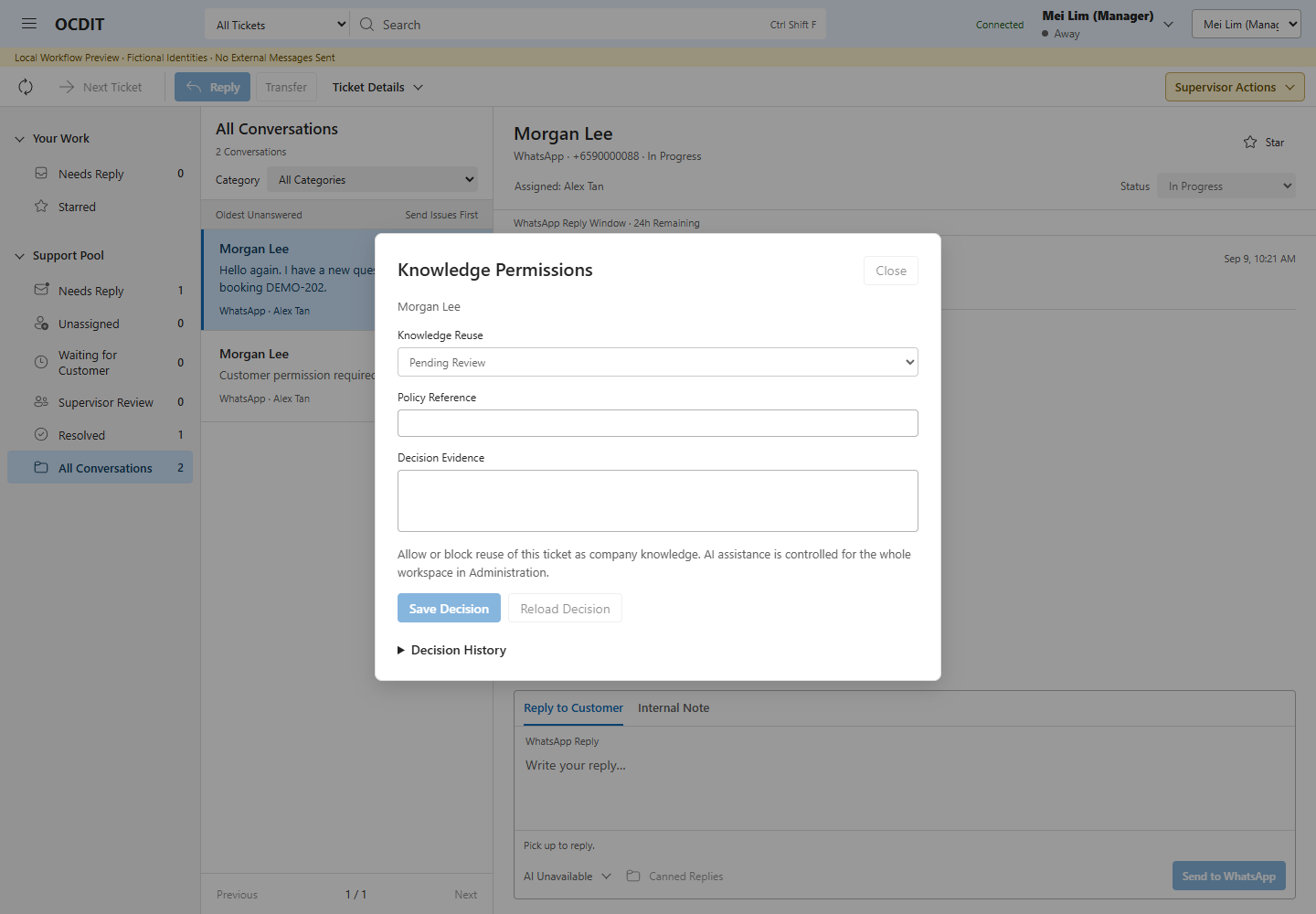
- Open the active ticket → Supervisor Actions → Knowledge Permissions.
- Review Knowledge Reuse and Decision History.
- Choose the knowledge decision, enter Policy Reference and Decision Evidence, then choose Save Decision.
- For a conflict, use Reload Decision and review the current record. After an uncertain result, use Check Last Action for the same request.
Enforcement
- Pending and Blocked prevent source-based knowledge creation, revision, approval and insertion.
- Linked knowledge permission is checked again when replies are queued and dispatched.
- Withdrawal prevents future linked reuse; it neither deletes evidence nor recalls messages.
- Manual copying is outside reference-based enforcement. Follow the applicable policy.
- Knowledge reuse permission does not turn tenant AI on or off. Capture exclusions, history access, central features, provider configuration, quotas, publication and stop controls still constrain AI requests.
Ordinary staff cannot grant knowledge reuse. Decisions require a current version and stable request identity; stale changes and changed retries are rejected.
Pause Capture
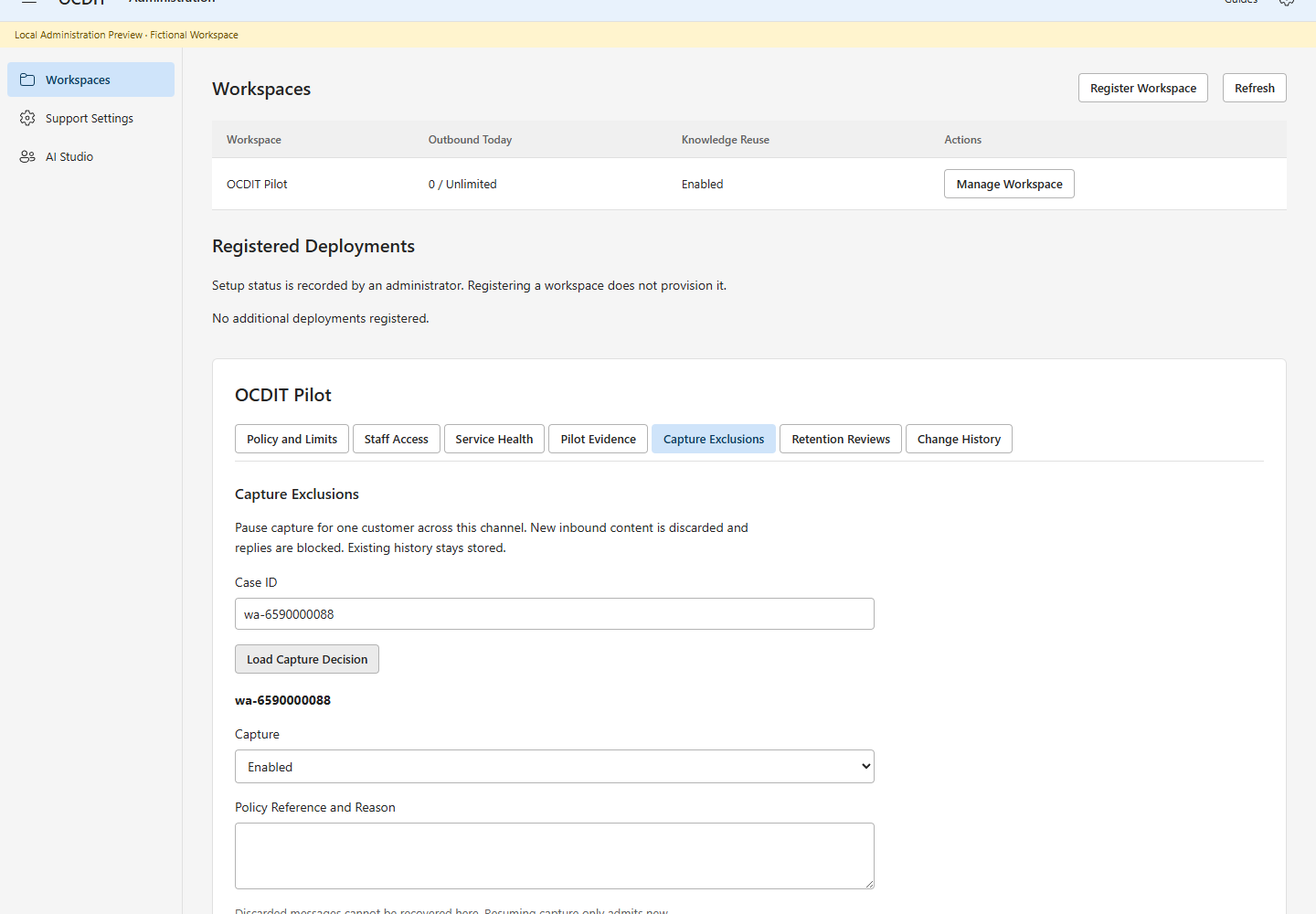
These controls are tested and deployed. Only a 99 Venture platform administrator can change an exclusion; support and workspace-admin roles cannot.
- Open Platform Administration, then Manage Workspace.
- Choose Capture Exclusions.
- Enter Case ID, then choose Load Capture Decision. The case ID is the
channel-prefixed identifier in the Inbox ticket link, such as
wa-6590000001. - Choose Paused, enter Policy Reference and Reason, then save.
- To resume, load the current decision and choose Enabled with a reason.
Exclusions can be prepared before the customer's first message. WhatsApp, LINE and WeChat use the same ingestion guard. While paused, inbound message content is acknowledged but not stored or forwarded. New replies and source-based knowledge/AI use are blocked. A reply already sending must finish before capture can be changed; queued replies fail before provider dispatch if capture remains paused.
Excluded delivery IDs are retained only as hashes so retries remain excluded after capture resumes. The customer rule is also keyed by a hash. Hashes are pseudonymous, not a claim of anonymous data. Keep customer details out of the policy reason. Messages received while paused cannot be recovered from OCDIT. Resuming admits new deliveries; it does not replay excluded messages. This is an arrival-time control, not a filter based on the customer's message timestamp.
Earlier messages, notes, profiles, knowledge and provider/Teams copies remain stored. Capture exclusions do not delete them. An in-flight provider request cannot be recalled. Rules and reasons are versioned and audited; uncertain saves can be checked using the same request ID.
The retention workflow below completes the Stage 1 Build. Real policy ownership and permitted purposes must be agreed with 99 Venture before using customer data.
Retention Workflow Build Status
The retention backend and operator workflow are tested and deployed. The full deletion rehearsal used fictional local data; no live pilot records were deleted.
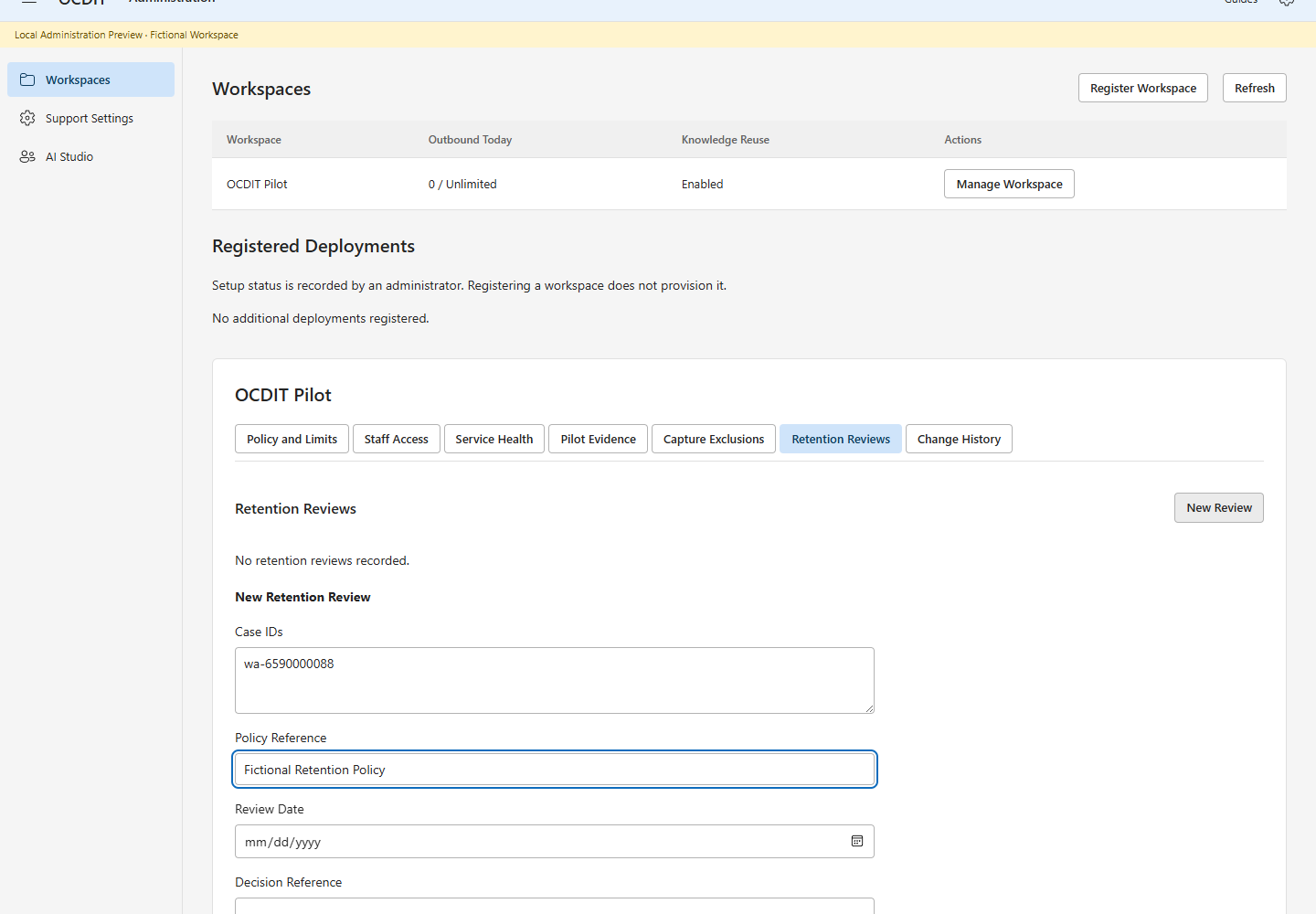
- As a platform administrator, open Retention Reviews, then New Review.
- Enter case IDs, Policy Reference, Review Date and Decision Reference.
- Choose Create Review, then Preview Deletion.
- If linked cases are listed, review them, update Case Scope, choose Update Scope and save. Preview again. Resolve cases, pause capture and settle outstanding deliveries before approval.
- Use Place on Hold when policy or ownership is unresolved. A held request must be released before approval. Cancel Review closes a request without deletion.
- After reviewing the preview, choose Approve Deletion, enter the decision reference and save. Any changed source record requires a fresh review.
- To execute the approved local deletion, type the exact Deletion Confirmation shown in the field, record the reason and choose Delete Local Records.
- Record disposition of external copies and supporting evidence. Choose Complete External Disposition, then save. Only attest to work actually done.
- Use Decision History to inspect who acted, when and why.
Save operations preserve the same request on an uncertain result. Use Check Last Action; do not create a new deletion request to recover from a timeout. A stale review requires Refresh and a new preview. Approval and execution can use the same authorized operator in this pilot; a separate-person sign-off is an operational policy gate, not an enforced dual-control claim.
The workflow records a policy reference, review date and explicit case scope. A request can be held, released, revised or cancelled. Approval requires all linked cases to be included, resolved, capture-paused and free of queued or uncertain outbound work. The review date is a date for operator review, not an automatic deletion schedule or a prescribed legal retention period.
The preview includes historical profile links and recorded knowledge reuse links. It does not automatically expand the deletion scope. The administrator must review and include related cases explicitly. A changed case or derived record invalidates the approved preview. Local deletion requires the exact request confirmation and no in-flight delivery worker. Unknown storage tables block deletion until their retention handling has been reviewed.
Local deletion removes the selected conversation records, notes, audit detail, read markers, transitions, profile records/history, source knowledge/history, feedback/history, linked receipts and delivery jobs. Cached action response bodies are invalidated so retries cannot return erased content. Legacy data-use caches lack case keys: all their response bodies are invalidated, but current decisions for unrelated cases remain available. Retry digests are retained. The request's case IDs are replaced with hashes after deletion; capture exclusions remain active.
This is logical deletion from the current application database, not certified physical media erasure. SQLite free pages/WAL, snapshots, backups, logs, Teams, providers and manually copied text need their own disposition. No paraphrase or unrecorded copy detection is claimed. A request remains Purged, not Complete, until the operator records disposition evidence for Teams, providers, backups and manual copies. Keep personal data out of policy references and completion evidence. Restoring a backup requires reapplying deletion/exclusion decisions before reopening service. Policy owners must decide how retained receipts and audit references are handled; do not infer a legal basis from an OCDIT status.
AI suggestions and their cached review responses are included in local deletion. Hashed AI/outbound attempt records retain the date and kind of usage so erasure cannot reset a daily quota. In-flight generation blocks deletion approval. Provider copy disposition includes any future AI provider; local tests have made no such calls.