Central Tenant Administration
Updated 9 September 2026
Goal
Before client rollout, one 99 Venture sign-in must manage multiple isolated customer workspaces. Customer staff use Teams only. Customer Microsoft 365 administrators approve installation; that role grants no OCDIT administration access.
Architecture
Keep one support runtime and separate support/Studio databases per customer. Add a central administration gateway that reuses the existing admin interface and APIs. The gateway authenticates only explicitly allowed 99 Venture identities, resolves the selected customer from server-controlled configuration, and forwards bounded requests to that customer's runtime. No browser-supplied target URLs or credentials.
Each runtime accepts delegated administration only through a separately authenticated server-to-server boundary. Bind the acting administrator, destination workspace, method, path and body to short-lived signed requests. Reject replay, stale requests, wrong destinations and unapproved actors. Customer Teams authentication remains independent. Never forward browser cookies or Microsoft bearer tokens downstream.
The first release uses one gateway instance and independently deployed customer runtimes. It does not share SQLite files, merge customer records, or introduce automatic infrastructure provisioning. Onboarding new runtimes remains an explicit operator deployment action.
Delivery Checklist
- [x] Implement server-configured tenant catalogue and signed delegation boundary.
- [x] Route all existing Admin and Studio APIs through the selected workspace.
- [x] Add a consistent tenant selector and visible customer context across Admin and Studio.
- [x] Keep selection per browser tab; preserve it through navigation and reject stale writes.
- [x] Verify two isolated fictional runtimes, including duplicate record IDs, policy, staff, knowledge, agents, token quotas and exports.
- [x] Test unauthenticated/customer denial, forged selection, replay, wrong signing key, wrong destination, upstream failure and no automatic mutation retries.
- [x] Update setup/client guides, screenshots and rollback instructions; run full suite.
- [x] Deploy the gateway for the existing test workspace with a reversible backup.
- [x] Verify real operator Microsoft sign-in and navigation through the central gateway.
- [ ] Onboard the client runtime after identities, hosting and permissions are ready.
Implementation Checkpoint
The signed delegation and bounded gateway transport are deployed for the existing test workspace. Five new tests cover request binding/replay, two independent HTTP runtimes and the real customer Admin/Studio APIs. All 138 application tests pass. The selector works across Administration, Support Settings and AI Studio. Real central Microsoft sign-in passed for the implementation operator; client runtime onboarding remains outstanding. Desktop and 390-pixel mobile browser checks passed, including per-tab selection and navigation into Studio. Policy, staff, agent definitions, source permission, quota and export isolation passed through the real APIs. An upstream disconnect after receiving a write returns an uncertain result and makes exactly one attempt. The screenshot uses only fictional workspaces.
Central Deployment — 9 September 2026
The central portal now uses the client-owned Entra app on the existing owned test host. Only the two nominated platform operator IDs are configured. Signed live runtime checks accepted both operators and denied both support tester IDs; this does not substitute for those users signing in themselves. Anonymous requests to the central and support APIs were denied. All seven tickets, 31 messages and Studio entities matched the pre-deployment backup. Unrelated environment values and all eight unrelated nginx configurations were preserved. No model calls or customer messages were sent for this release.
The implementation operator completed Microsoft sign-in through the new central app. Administration, Support Settings and AI Studio loaded successfully and retained the selected customer. The second operator's own sign-in and the two support testers' Teams acceptance remain to be performed by those users.
The catalogue currently contains Existing Test Workspace. It is the original demo runtime, not a new client support deployment. Azure hosting, the client Teams package and two-person support acceptance remain separate rollout steps.
Operator Steps
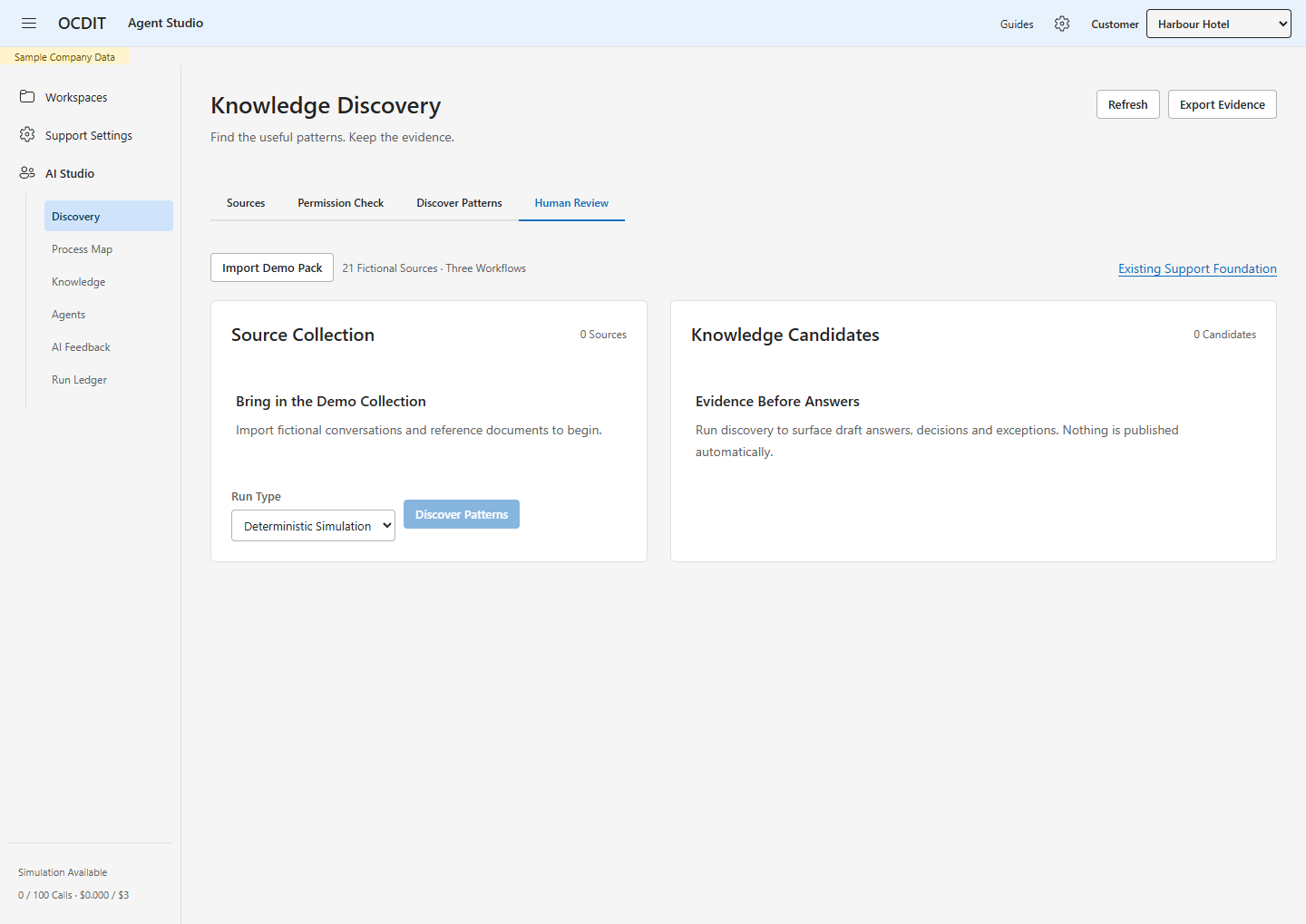
- Sign in to the central Administration address with your approved 99 Venture identity.
- Choose Customer in the header. The selection stays with this browser tab.
- Open Support Settings or AI Studio to manage that customer.
- Finish or check any pending action before switching customers. Switching reloads the page; unsaved changes are not copied to another customer.
- If a workspace is unavailable, check its service before retrying. A failed connection never sends the action to a different customer.
Deployment Configuration
Run node dist/control-plane.js from the application directory as a separate
loopback-only service. It does not start customer connectors or message workers.
Terminate HTTPS at the reverse proxy. Route /admin/, /admin-api/ and
/admin-tenants to this service. Keep support Inbox and webhook routes on their
customer runtime. The central service also serves the shared theme and icon files.
Central environment variables:
ADMIN_PORT: loopback port, default 4400.ADMIN_ORIGIN: exact public HTTPS origin, without a path.ADMIN_TENANT_ID,ADMIN_CLIENT_ID,ADMIN_CLIENT_SECRET: central Entra app.PLATFORM_ADMINS: JSON array of verified object IDs in the central directory.ADMIN_DESTINATIONS: JSON array ofid,label,origin,keyentries.
Each destination ID must equal its runtime's WORKSPACE_ID. Use a different random
32-byte base64url key per runtime; store it only in protected environment files.
Set that runtime's ADMIN_DELEGATION_KEY to the matching key and its
PLATFORM_ADMINS to the central operator object IDs. Customer Teams IDs remain
separate. Never use an email string or a customer role as an authorization shortcut.
Destinations require HTTPS, except explicit loopback addresses on the same server.
Do not expose an internal HTTP port to the internet.
Restart the central service after changing its catalogue or administrators. Remove an operator from customer allowlists too. Session revocation takes effect on restart. The replay table is additive and must remain with the customer database. Rotation requires updating both ends; it does not delete request or message history.
Entra Setup and Access Troubleshooting
- In the central operator directory, open Entra ID → App Registrations → New Registration.
- Name the app OCDIT Administration, select Single Tenant, and add a Web
redirect URI matching
ADMIN_ORIGINfollowed by/admin/auth/callback. - Add the implementation account under the App Registration → Owners list. Enterprise Application → Owners is a separate list; verify both where needed.
- Record the Application (Client) ID, Directory (Tenant) ID, and each approved operator's directory Object ID. Guest accounts have a different Object ID in the central directory from their home directory.
- Verify access to the exact app before configuring credentials. Keep secrets in protected deployment storage, never chat or documentation.
- Keep support tester IDs separate from platform operator IDs. An M365 role or app ownership does not automatically grant OCDIT Admin Portal access.
Pilot Troubleshooting Record — 9 September 2026
- Azure resource group access worked, but Entra Users and App Registrations returned HTTP 401. Successful sign-in and MFA did not resolve directory authorization.
- The client created the central sign-in app and supplied its IDs and four user IDs.
- An initial owner save did not complete. After saving, fresh sign-in, the app list and a direct app URL still returned 401.
- A supplied screenshot showed ownership on the Enterprise Application. Its page linked to the separate App Registration owner list; ownership there had not been verified.
- The client then reported assigning Cloud Application Administrator to the implementation account. The subsequent direct app check succeeded: the expected Client ID and directory matched, the app was single-tenant, and its configuration pages became accessible. No directory role was granted by the implementation agent.
- The App Registration owner list then confirmed the implementation guest account. The Web callback matched the intended administration URL; implicit token grants and public client flows were disabled. No client credential existed yet.
- A 180-day pilot credential was then created with explicit approval. Its first
value appeared in a tool result because output filtering missed an accessibility
label. That unused credential was deleted with approval, the empty list verified,
and a replacement stored privately without displaying its value. Neither was
deployed during this setup step. Future credential inspection must suppress entire
credential rows and labels, rather than redact only
Valueattributes.
Do not treat that broad directory role as a routine onboarding prerequisite or proof that app ownership cannot work. Check the selected directory, completed owner save, app-specific access, guest restrictions and a fresh session first. If the client grants a broader role for setup, record it and agree its removal or reduction after setup; do not change roles automatically. App registration ownership is the preferred scope when it is sufficient. See Microsoft's delegation guidance.
Runtime Rollback
Back up both customer databases consistently, current application files, environment and dedicated proxy configuration before deployment. On rollback, stop the central service and restore the previous dedicated admin routing and application files. Keep newer customer databases and delivery records; never overwrite them with the pre-deployment snapshot. Recheck Inbox SSO, webhooks and an authorized admin sign-in.
Acceptance Boundary
Two local fictional workspaces prove software isolation. They do not prove client Microsoft consent, real multi-person access or Azure connectivity. Report those separately. Do not relabel the existing demonstration as a client deployment.
Global persona templates and automatic runtime provisioning are outside this slice. The existing per-workspace personas, knowledge and agent publication remain centrally managed and isolated. No shared company knowledge is inferred from tenant selection.